Showing posts with label ZBIGZ PREMIUM COOKIES. Show all posts
Showing posts with label ZBIGZ PREMIUM COOKIES. Show all posts
Sunday, 17 February 2013
Monday, 11 February 2013
ZBIGZ PREMUM COOKIE (11/02) 03.10 PM
FRIENDS TODAY'S ZBIGZ PREMIUM COOKIES UPDATED AT 03.10 PM..
FOR THE TUTORIAL ABOUT HOW TO USE ZBIGZ COOKIES VISIT MY LAST POST..... TUTORIAL..
PUT ZeroBigZ.Com_ZbigZ_Cookie_246777
in the place of content in cookies manager+
Monday, 21 January 2013
ZBIGZ PREMUM COOKIE (21/01) 01.13 PM
FRIENDS TODAY'S ZBIGZ PREMIUM COOKIES UPDATED AT 01.13 PM..
FOR THE TUTORIAL ABOUT HOW TO USE ZBIGZ COOKIES VISIT MY LAST POST..... TUTORIAL..
PUT 8HoursZbigz
in the place of content in cookies manager+
Tuesday, 15 January 2013
ZBIGZ PREMUM COOKIE (15/01) 04.13 PM
FRIENDS TODAY'S ZBIGZ PREMIUM COOKIES UPDATED AT 04.13 PM..
FOR THE TUTORIAL ABOUT HOW TO USE ZBIGZ COOKIES VISIT MY LAST POST..... TUTORIAL..
PUT ZeroBigZ.Com_ZbigZ_Cookie_87965
in the place of content in cookies manager+
Thursday, 10 January 2013
ZBIGZ PREMUM COOKIE (10/01) 12.30 PM
FRIENDS TODAY'S ZBIGZ PREMIUM COOKIES UPDATED AT 12.30 PM..
FOR THE TUTORIAL ABOUT HOW TO USE ZBIGZ COOKIES VISIT MY LAST POST..... TUTORIAL..
PUT a9bp8ivj5b4lpp6bgj9vcoeh72
in the place of content in cookies manager+
Tuesday, 8 January 2013
ZBIGZ PREMUM COOKIE (08/01) 03.06 PM
FRIENDS TODAY'S ZBIGZ PREMIUM COOKIES UPDATED AT 03.06 PM..
FOR THE TUTORIAL ABOUT HOW TO USE ZBIGZ COOKIES VISIT MY LAST POST..... TUTORIAL..
PUT ZeroBigz.CO_ZbigZ_Cookies_652451
in the place of content in cookies manager+
Friday, 4 January 2013
ZBIGZ PREMUM COOKIE (10/01) 10.52AM
FRIENDS TODAY'S ZBIGZ PREMIUM COOKIES UPDATED AT 10.52 AM..
FOR THE TUTORIAL ABOUT HOW TO USE ZBIGZ COOKIES VISIT MY LAST POST..... TUTORIAL..
PUT a9bp8ivj5b4lpp6bgj9vcoeh72
in the place of content in cookies manager+
Wednesday, 2 January 2013
A TORRENT LEECHING SITE LIKE ZBIGZ [NO LIMIT] FREE
HELLO MAHARASHTRIANS---------
JUST NOW I DISCOVERED A NEW TORRENT LEECHING SITE BY WHICH YOU CAN DOWNLOAD TORRENT USING IDM.
FEATURES OF THE SITE ARE AS FOLLOWS---
-
Unlimited File Size
Unlimited Downloading SpeedDownload Manager SupportedResume Supported DownloadsDirect Downloadable LinksAbility to Upload Files on Other ServerFile Validity ~ 2 DayURL Uploading FunctionOnline Streaming FunctionUncompress ZIP & RAR FilesAutomated AJAX Update FunctionAnd at last the name of the site is-----http://leechitnow.co.in/
Monday, 31 December 2012
ZBIGZ PREMUM COOKIE (31/12) 2.10PM
FRIENDS TODAY'S ZBIGZ PREMIUM COOKIES UPDATED AT 2.10 PM..
FOR THE TUTORIAL ABOUT HOW TO USE ZBIGZ COOKIES VISIT MY LAST POST..... TUTORIAL..
PUT ZeroBigz.COM_ZbigZ_Cookies_9542162
in the place of content in cookies manager+
Sunday, 30 December 2012
ZBIGZ PREMUM COOKIE (30/12) 4.10PM
FRIENDS TODAY'S ZBIGZ PREMIUM COOKIES UPDATED AT 4.10 PM..
FOR THE TUTORIAL ABOUT HOW TO USE ZBIGZ COOKIES VISIT MY LAST POST..... TUTORIAL..
PUT ZeroBigz.COM_ZbigZ_Cookies_956470
in the place of content in cookies manager+
ZBIGZ PREMUM COOKIE (30/12) 11.30AM
FRIENDS TODAY'S ZBIGZ PREMIUM COOKIES UPDATED AT 11.30 AM..
FOR THE TUTORIAL ABOUT HOW TO USE ZBIGZ COOKIES VISIT MY LAST POST..... TUTORIAL..
PUT ZeroBigz.COM_ZbigZ_Cookies_956470
in the place of content in cookies manager+
Friday, 28 December 2012
ZBIGZ PREMUM COOKIE (28/11) 1.30PM
FRIENDS TODAY'S ZBIGZ PREMIUM COOKIES UPDATED AT 1.30 PM..
FOR THE TUTORIAL ABOUT HOW TO USE ZBIGZ COOKIES VISIT MY LAST POST..... TUTORIAL..
PUT k8bvqbtg3agu4h801uru2umv41
in the place of content in cookies manager+
ZBIGZ PREMUM COOKIE (28/11) 12.12PM
FRIENDS TODAY'S ZBIGZ PREMIUM COOKIES UPDATED AT 12.12 PM..
FOR THE TUTORIAL ABOUT HOW TO USE ZBIGZ COOKIES VISIT MY LAST POST..... TUTORIAL..
PUT kpsesao2h05e9enuvr6vpdu3a0
in the place of content in cookies manager+
Thursday, 27 December 2012
ZBIGZ PREMUM COOKIE (27/11) 9.33PM
FRIENDS TODAY'S ZBIGZ PREMIUM COOKIES UPDATED AT 9.33 PM..
FOR THE TUTORIAL ABOUT HOW TO USE ZBIGZ COOKIES VISIT MY LAST POST..... TUTORIAL..
PUT h6krdlkd5329kndjfi2moj6f44
in the place of content in cookies manager+
ZBIGZ PREMUM COOKIE (27/11) 11.35AM
FRIENDS TODAY'S ZBIGZ PREMIUM COOKIES UPDATED AT 11.35 AM..
FOR THE TUTORIAL ABOUT HOW TO USE ZBIGZ COOKIES VISIT MY LAST POST..... TUTORIAL..
PUT 7uo8pl893ag1q2rj6u1m4ido42
in the place of content in cookies manager+
Tuesday, 25 December 2012
ZBIGZ PREMUM COOKIE (25/11) 1.35PM
FRIENDS TODAY'S ZBIGZ PREMIUM COOKIES UPDATED AT 1.35 PM..
FOR THE TUTORIAL ABOUT HOW TO USE ZBIGZ COOKIES VISIT MY LAST POST..... TUTORIAL..
PUT cmdsjh5mhdi458mskjw3j950u3
in the place of content in cookies manager+
ZBIGZ PREMUM COOKIE (25/11) 1.01PM
FRIENDS TODAY'S ZBIGZ PREMIUM COOKIES UPDATED AT 1.01 PM..
FOR THE TUTORIAL ABOUT HOW TO USE ZBIGZ COOKIES VISIT MY LAST POST..... TUTORIAL..
PUT
cmtui3didfmb5oboga29ckidfjsyu5kfkjdjf0
in the place of content in cookies manager+
Monday, 24 December 2012
ZBIGZ PREMUM COOKIE (24/11) 1.35PM
FRIENDS TODAY'S ZBIGZ PREMIUM COOKIES UPDATED AT 1.35 PM..
FOR THE TUTORIAL ABOUT HOW TO USE ZBIGZ COOKIES VISIT MY LAST POST..... TUTORIAL..
PUT kmnu6tyg4cxsw4plmnkiizamn8dc4nfdsf4 in the place of content in cookies manager+
ZBIGZ PREMUM COOKIE (24/11) 12.35PM
FRIENDS TODAY'S ZBIGZ PREMIUM COOKIES UPDATED AT 12.35 PM..
FOR THE TUTORIAL ABOUT HOW TO USE ZBIGZ COOKIES VISIT MY LAST POST..... TUTORIAL..
PUT mnhut5wetcxzqpo8mnjh4plcdsw8mnbfd in the place of content in cookies manager+
ZBIGZ PREMIUM COOKIES TUTORIAL
For Firefox Users:
Download Cookie Manager Plus:
Go to Zbigz Log Out If already logged in
1.Click on Tools>Cookie Manager +
2. Search for zBigz
3. Click On PHPSESSID and Edit

4. Change the Value Given By Me and Save

5. Reload The page.
IF you cant find cookie manager+ in Firefox then use this :
Go tot top left and click Firefox button and this should appear.

and then click on web developer and there you will get cookie manager+

================================================== ==
for Google Chrome Users
1.Goto Chrome Store download extension called Edit this Cookie :
2.After installing Edit This Cookie go to zbigz.com and Logout if u are already logged in (Important)
2.1. Click on the Edit this Cookie icon
3. Click On Delete All and reload the page.
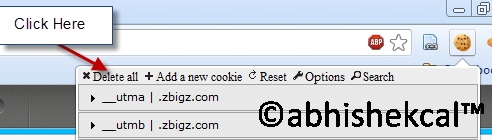
4.Click On PHSSID:
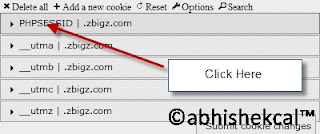
5. And paste the value :
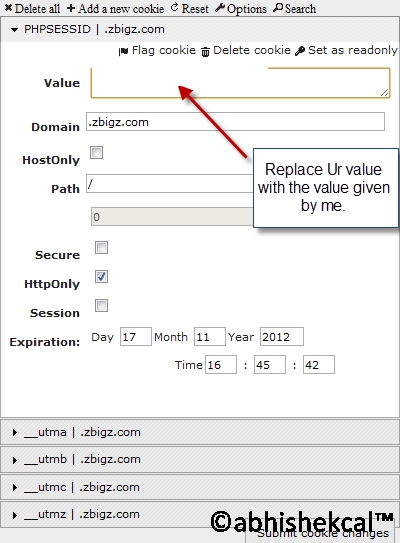
6. Click On Delete All and reload the page.
S.S FOR PROOF

Download Cookie Manager Plus:
Go to Zbigz Log Out If already logged in
1.Click on Tools>Cookie Manager +
2. Search for zBigz
3. Click On PHPSESSID and Edit
4. Change the Value Given By Me and Save
5. Reload The page.
IF you cant find cookie manager+ in Firefox then use this :
Go tot top left and click Firefox button and this should appear.
and then click on web developer and there you will get cookie manager+
================================================== ==
for Google Chrome Users
1.Goto Chrome Store download extension called Edit this Cookie :
2.After installing Edit This Cookie go to zbigz.com and Logout if u are already logged in (Important)
2.1. Click on the Edit this Cookie icon
3. Click On Delete All and reload the page.
4.Click On PHSSID:
5. And paste the value :
6. Click On Delete All and reload the page.
DAILY 2-3 TIMES PREMIUM COOKIES OF ZBIGZ WILL BE UPDATED ON maharashtratricks.blogspot.co.uk.
so visit it daily S.S FOR PROOF
Subscribe to:
Posts (Atom)